Cyral Data Access Portal
One place to reach every database, without a password
From shared passwords to one sign-in across hundreds of databases.
- Role
- Product Designer
- Team
- Cross-functional, 6
- Platform
- Web Application
- Timeline
- Q1 2024
Cyral’s enterprise customers ran hundreds of databases, used by two kinds of people: the administrators who kept them, and the employees who needed them for their work. The Data Access Portal gave both one place to reach them. Everyone signed in once through their company’s identity provider and connected with a short-lived token, so data users stopped juggling passwords and administrators could tell who was behind every connection.
Problem
Hard to control, hard to use
Most databases have no single sign-on, and each type handles logins its own way. Administrators ended up handing out shared accounts they couldn’t trace, data users kept a different password for every database they touched, and the portal needed to work for both of them.
Database administrators
| Time | User | Action |
|---|---|---|
| 09:14 | shared_admin | Viewed claims |
| 09:31 | shared_admin | Viewed member SSNs |
| 10:05 | shared_admin | Changed a member’s plan |
| 10:42 | shared_admin | Deleted claims |
| 11:20 | shared_admin | Exported every member |
Data users
Solution
One portal, designed for both
Administrators and data users saw the same portal. Each person signed in as themselves and never held a database password, since Cyral fetched the account’s credentials from the company’s own vault. Administrators could trace every connection in Cyral’s control panel, and data users got one list of what they could reach, until when.
Avoid cognitive overload
Each account held its connection details, its access restrictions and a command for every tool. I grouped related values into blocks, connection details in one and restrictions in another, and folded each account into an accordion that opens one at a time.
Asking for access in one place
A data user who needed more asked for it here: a repository, an account and the dates they needed it. Administrators approved it in Cyral’s control panel, where they could also add conditions, like only allowing connections while someone was on call. The access ran out on its own when the dates did.
One row shape for every repository type
Every repository sits in the list the same way. Only the connection panel inside it changes with the type.
Connect in the tool you already use
Most users spent their day in Looker or a spreadsheet, not a terminal, so the portal was a web interface first. Power users still got a ready-made command for their own client, with the token already in it.
PGPASSWORD=***************** PGSSLMODE=require psql -h sidecar-east.demo.hhiu.us -p 5432 -U "nancy.drew@hhiu.us:analyst" example_dbIteration
Where do I look for areas of improvement?
Opportunities for improvement became apparent once the feature was in the hands of real users. With limited bandwidth for research after release, I sourced feedback from support requests on Slack, from administrators and their users alike, and from the support developers who triaged them.
Optimizing search and filter
A customer might have a dozen repositories or a thousand, so search had to hold at any scale. Backend optimizations made it fast enough for results to appear as people typed. Filtering grew from repository name to type, database account and user, with loading states for queries that took longer.
Redesign
What I’d do differently now
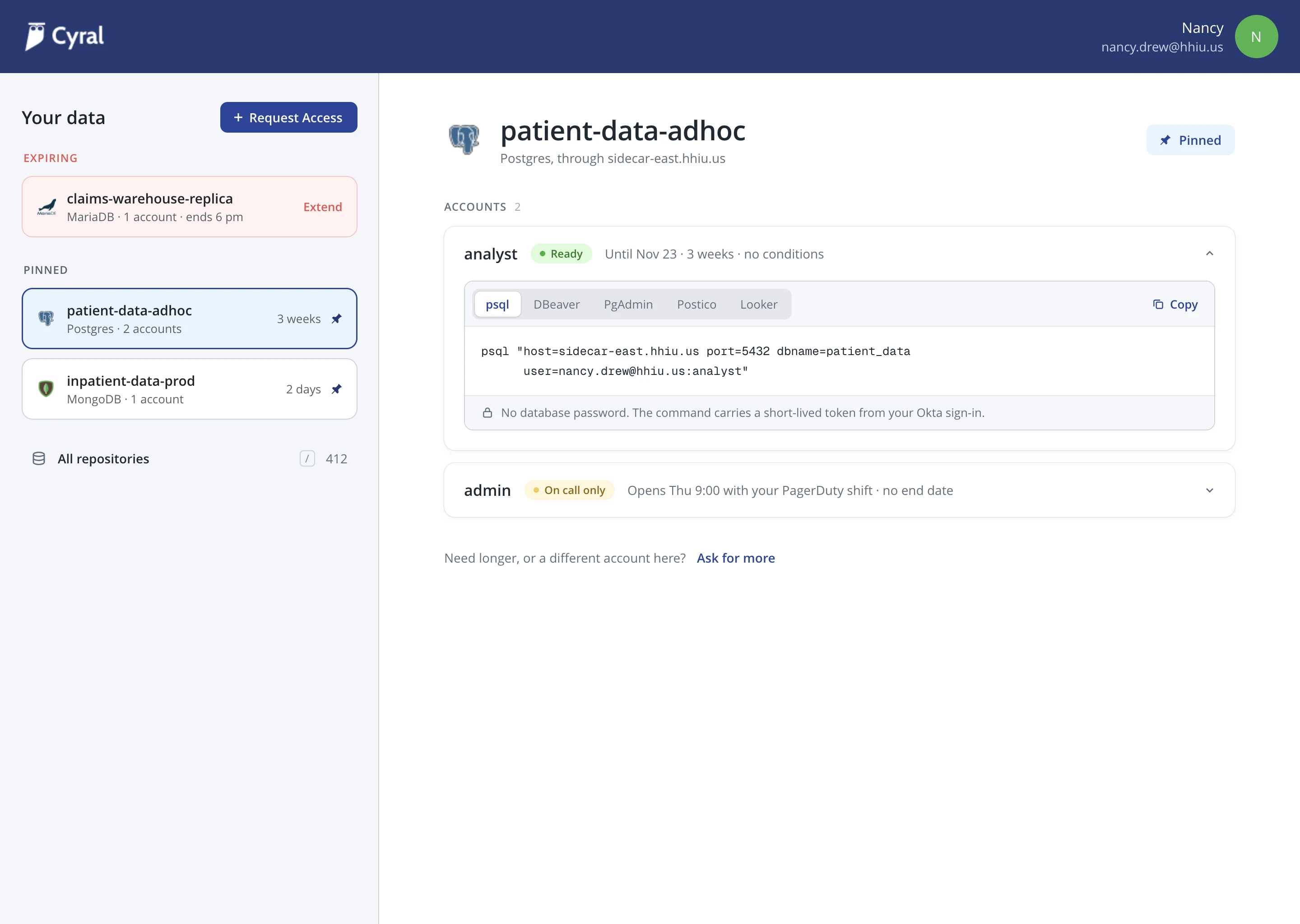
I redrew the portal with what I know now: expiring access and pinned repositories kept in the sidebar, one list of everything else to search and filter across types, and a first visit that starts from what an admin has already granted.

Reflection
What I learned
Isolate who you design for
Administrators and data users shared one screen, and every decision had to hold for both: what one needed to see, the other needed kept simple. The more useful question would’ve been where each of them needed the screen to differ.
The research channel usually already exists
Support developers already knew which complaints recurred and which were one-offs. Talking with them showed where users struggled.